Share a list
There's no "share" button on a favorites list or a preset: they live in your browser. You can still pass them on. This guide covers the two ways to share a list of items, then the other links worth sending:
- Send a favorites list as a file: your friend gets the list itself, and can keep using it.
- Share a table as a link: a
/sharelink opens a prices table with your filters, sort and columns, with live prices.
You need: nothing. Neither needs an account, for you or the person you share with.
Send a favorites list as a file#
Open the export#
Go to Settings (the cog icon, top right) and open the Settings tab. The Export column lists what goes in the file.
Tick only what you want to share#
Open Favorites and click the lists to untick everything but the one to share. Then open the other sections and untick what you'd rather keep to yourself: Columns (your custom columns), Portfolio (its Portfolio Data holds your purchases and prices) and Recipes (your favorite recipes).
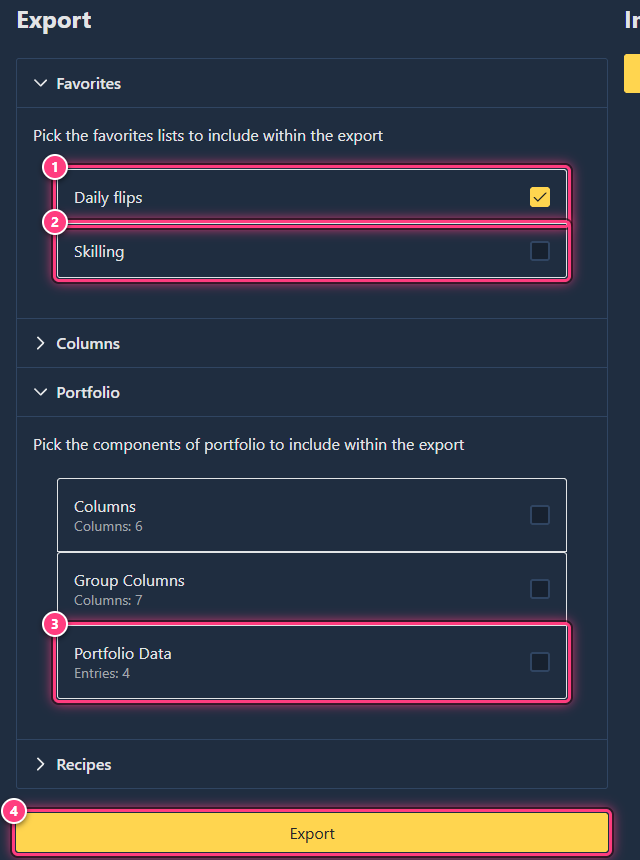
Export and send the file#
Click Export. Your browser downloads a file named like osrscloud-2026-11-21T12-00-00.json. Send it over Discord,
email, anything that carries files.
Your friend imports it#
On their side: Settings, Settings tab, Import, Choose, pick the file. Under Favorites, the shared list is ticked; they click Import. The list appears on their Favorites page. If they already have a list with the same name, it's flagged with a warning icon and left unticked: ticking it replaces their list. Details in back up and restore your settings.
Share a table as a link#
/share is a prices table that writes everything you change (filters, sort, columns, page, rows per page)
into the page address. The address is the link.
Open the share page#
Go to prices.osrs.cloud/share. It's the same table as the home page, without the preset dropdown, starting with the default columns and the "traded in the last hour" filter.
Set it up#
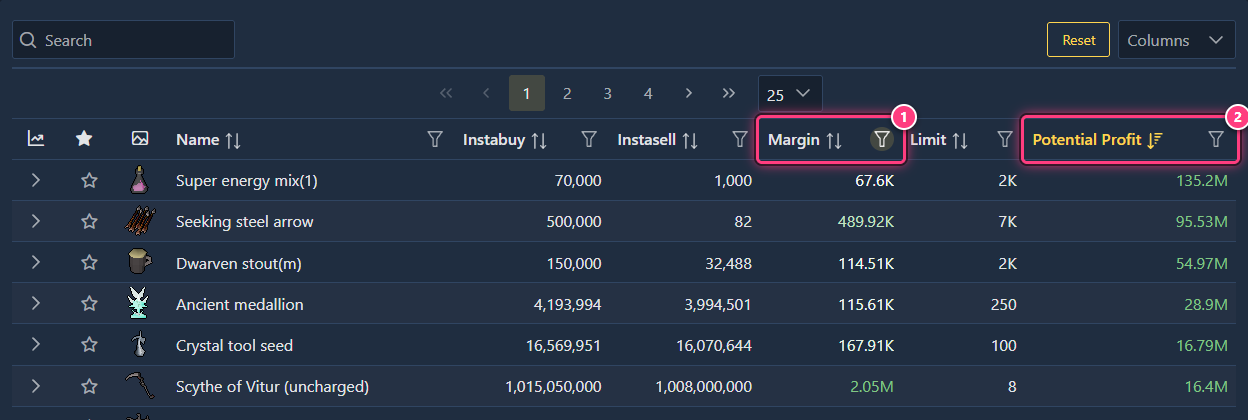
Filter, sort and pick columns exactly as in build and save a preset. Each change updates the address bar.
Copy the address#
Copy the URL from your browser's address bar and send it. Whoever opens it gets the same table, with the prices of the moment they open it. They can change it too: that only changes their copy of the link.
This link shows items with a margin of at least 50K and a volume of 100 or more, sorted by potential profit:
https://prices.osrs.cloud/share?columns=Icon|Name|Instabuy|Instasell|Margin|Limit|Potential%20Profit&sort=computed.potentialProfit|-1&filters=%7B%22computed.margin%22%3A%7B%22operator%22%3A%22and%22%2C%22constraints%22%3A%5B%7B%22value%22%3A50000%2C%22matchMode%22%3A%22gte%22%7D%5D%7D%2C%22item.dailyVolume%22%3A%7B%22operator%22%3A%22and%22%2C%22constraints%22%3A%5B%7B%22value%22%3A100%2C%22matchMode%22%3A%22gte%22%7D%5D%7D%7D
Other things you can share#
| What | How |
|---|---|
| One item | Its page address, such as prices.osrs.cloud/item/4151 |
| A profit calculation | Share calculation (link icon) in the profit calculator copies a link with the prices and quantity |
| A recipe | The address of its page, or the recipe string from the recipe builder; opening it needs premium |
| Your whole setup | Export everything, see back up and restore your settings. Don't send it around: it holds your portfolio |
Troubleshooting#
The link opens an empty table. The filters are too strict for the current prices: widen one, or click Reset.
My friend's import shows nothing to import. The list they already have with that name is unticked on purpose: they tick it to overwrite theirs, or you rename yours before exporting (see organise favorites).
Next steps#
- Sharing: the feature page.
- Organise favorites
- Build and save a preset