Log and edit flips
The portfolio follows what you hold: each item you bought, when, how many and at what price, valued with live prices. This guide logs a purchase, reads its returns, then corrects it.
You need: premium and to be logged in.
Open the Holdings tab#
Open Portfolio (the chart icon in the top bar) and click the Holdings tab. An empty portfolio shows Add Your First Item on the Overview tab, which takes you there too.
Open the Add Item form#
Click Add Item to unfold the form (it's already open when the portfolio is empty).
Pick the item#
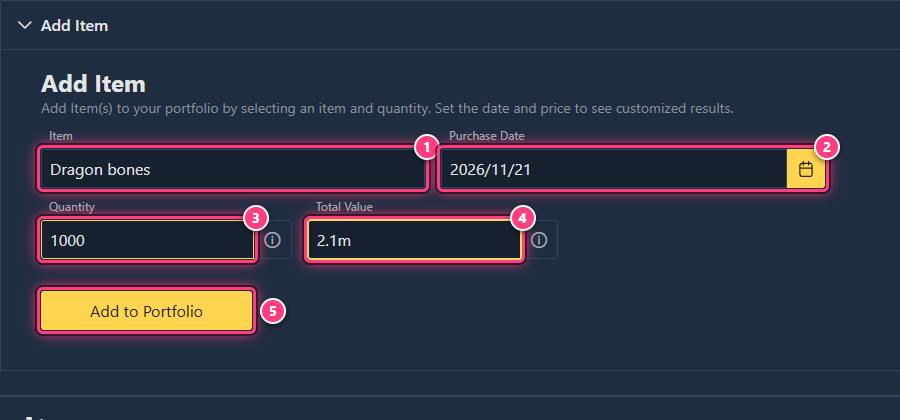
Type in Item and pick it in the list.
Set the purchase date#
Purchase Date defaults to today. Click the calendar to pick an earlier day (not a future one). The date is used to show how long you've held the item.
Set the quantity#
Type how many you bought in Quantity: 1000, 1.5k, 2m... Hover the (i) for the accepted formats.
Check the total value#
Once the item and quantity are set, Total Value fills itself with an estimate: the current price for today, or the
price on the chosen day ("Fetching value..." while it loads). Replace it with what you actually paid in total
(not per item), for example 2.1m.
Add it#
Click Add to Portfolio. "Item added to portfolio successfully." confirms it. Buying the same item again later? Add it again: each purchase is a separate entry, grouped under the item.
Read your holdings#
The table has one row per item: Total Qty, Avg. Buy Price, Current Price (the live instabuy), Avg. ROI and Total Returns (what you'd make selling everything now, after tax, compared with what you paid). The Overview tab sums it all up: total value, all-time, 24h and weekly change, best and worst performers, and charts.
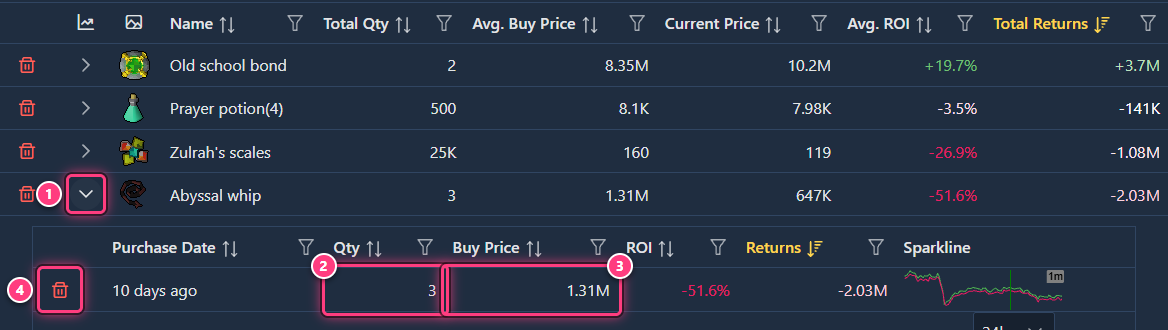
Click the arrow of a row to see its entries, one per purchase, with a price chart below.
Correct an entry#
Click the Qty or Buy Price cell of an entry: it turns into a box. Type the right value and press Enter.

A message confirms the change, and the totals update:
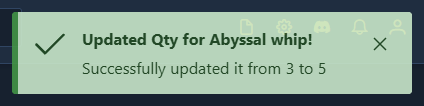
Values must be greater than zero. The Buy Price is per item, unlike the total you typed when adding.
When you sell#
The portfolio tracks what you hold, so a sale isn't logged: lower the entry's Qty if you sold part of it, or remove the entry once you sold everything (see delete flips).
Arrange the table#
Search Item filters the rows, the funnel of each header filters a column, and Columns picks the columns, for item rows (Group Header) and entry rows (Entries) separately. Reset offers Sorting + Filters or Columns.
Troubleshooting#
Add to Portfolio stays greyed out. Pick the item in the list (typing its name isn't enough) and enter a quantity in a valid format.
I can't change the purchase date. Only the quantity and buy price can be edited: remove the entry and add it again with the right date.
My portfolio is empty on another device. Entries are saved in the browser you added them in. Move them with back up and restore your settings.
Next steps#
- Delete flips: remove entries, items, or everything.
- Portfolio: every column and chart explained.
- Use the profit calculator before you buy.