Set up offer notifications
Once your offers show on Slots, the Flopper bot can message you on Discord when an offer changes state compared with the live prices: it would now fill instantly, it's in range, or it's out of range and won't fill. This guide turns that on for a whole RuneScape account, then fine-tunes a single slot.
You need: your slots on the site, see connect RuneLite and see your slots, and to stay on the Flipping Utilities Discord so the bot can reach you.
The three states, as the site names them:
| State | Buy offer | Sell offer | In the slot menu |
|---|---|---|---|
| Instafill | at or above the instabuy price | at or below the instasell price | Filled |
| In range (slow fill) | between instasell and instabuy | between instasell and instabuy | In Range |
| Out of range (won't fill) | below the instasell price | above the instabuy price | Out of range |
Turn on notifications for a whole account#
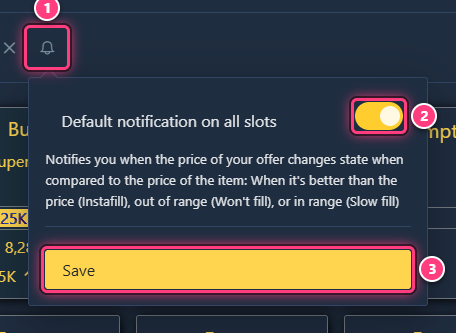
On Slots, click the bell right of an account's name. Switch on Default notification on all slots and click Save. "The default notification on all slots has been succesfully updated!" confirms it, and the bell turns yellow.
Fine-tune one slot#
Click the bell at the top right of a slot card. Switch on Slot Notification, then pick the states you care about: Filled, In Range, Out of range (switching on Slot Notification alone selects Filled). Click Save: "The slot notification has been succesfully created!" confirms it.
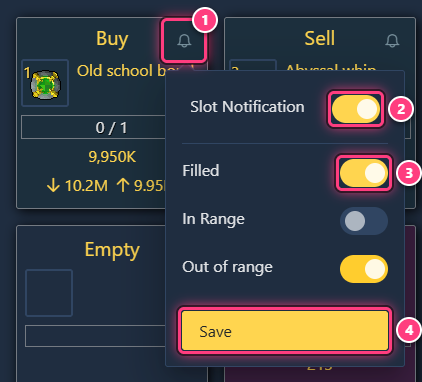
A typical setup for a buy offer: Filled (your offer is now above the market, you may be overpaying) and Out of range (the market moved away and it won't fill).
Change or turn it off#
Open the same bell, change the switches and click Save ("updated"). Switching off Slot Notification, or every state, and saving removes the slot's notification ("deleted"). For the account, switch off Default notification on all slots and save.
Troubleshooting#
The Save button doesn't show. It only appears once something changed in the panel.
No Discord message. The bot can only reach you while you're on the Flipping Utilities Discord, with direct messages from server members allowed. The plugin must also be sending slots: check Slot sending feature in the plugin.
Next steps#
- Slots and notifications: the feature pages.
- Track an item and get alerts