Notifications
When an item you track reaches one of your targets, the Flopper bot sends you a Discord DM, and the alert is also kept on the site. The bell in the top bar is your inbox for those alerts: it shows how many are new, plays a sound, and lists your latest ones with the prices that triggered them.
You need to be logged in to see notifications. Clicking the bell while logged out shows "You must be logged in to access your notifications!".
The bell and its badge#
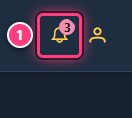
The site checks for new notifications every minute while a page is open. When there are notifications you haven't seen yet, a red badge shows how many. Opening the panel marks them all as seen. The bell is visible on every page, including on phones.
Sound: when new notifications arrive while the site is open, a short sound plays (on by default). Browsers may block it until you have clicked somewhere on the page.
The notifications panel#
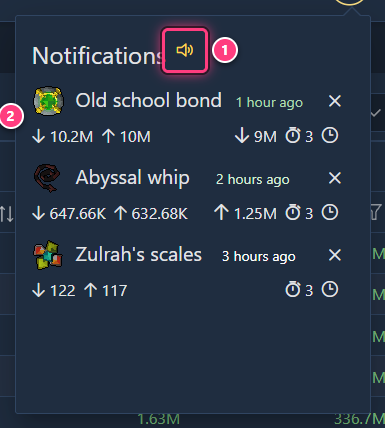
Click the bell to open the panel. It lists your 25 most recent notifications, newest first.
- Sound toggle (speaker icon next to the title): turns the notification sound on or off for this browser.
- A notification: one alert, with:
- the item icon and name (click it to open the item page), and how long ago the alert was sent;
- ↓ instabuy and ↑ instasell: the prices at the moment of the alert (hover for the exact price and time). A price is shown in green when it is the one that met your target;
- your targets: ↑ min price (notify when the price is above it) and ↓ max price (notify when the price is below it);
- a ⇄ icon when your minimum margin was reached (hover for the desired and actual margin, before tax);
- the stopwatch with the number of notifications left for that tracker (red at 0), and a clock when a minimum interval is set (hover for the value);
- a × button to delete the notification, after confirming. This only removes it from the list; the tracker keeps running.
With no notifications yet, the panel says "No notifications yet. Set one up on the tracking page." with a link to Track.
Setting up notifications#
Notifications come from trackers: one per item, with a min price, max price and/or min margin, a frequency and a number of repeats. Create them on the Track page or with the eye icon of an item page. Free accounts can track up to 5 items; premium is unlimited. Everything about trackers is in Item tracking.
Related#
- Item tracking
- Track an item and get alerts
- Slots: the plugin's slot notifications are separate and configured there