Sharing
Found a nice set of flips and want to show a friend or your clan? Most of the site can be shared with a link. This page lists what you can share and how.
| What | How | Needs |
|---|---|---|
| A filtered / sorted item table | A /share link | Nothing |
| One item | Its page link, e.g. /item/4151 | Nothing |
| A profit calculation | The calculator's Share calculation button | Nothing |
| Your favorites, columns, presets… | An export file from Settings | Sending the file |
Shareable tables (/share)#
/share is an item table (the same as the items page) whose state is
stored in the address bar. Every change you make (filters, sort, columns, page, rows per page) updates the
URL, so the URL itself is the link to share. Whoever opens it gets exactly the same table, with live prices.
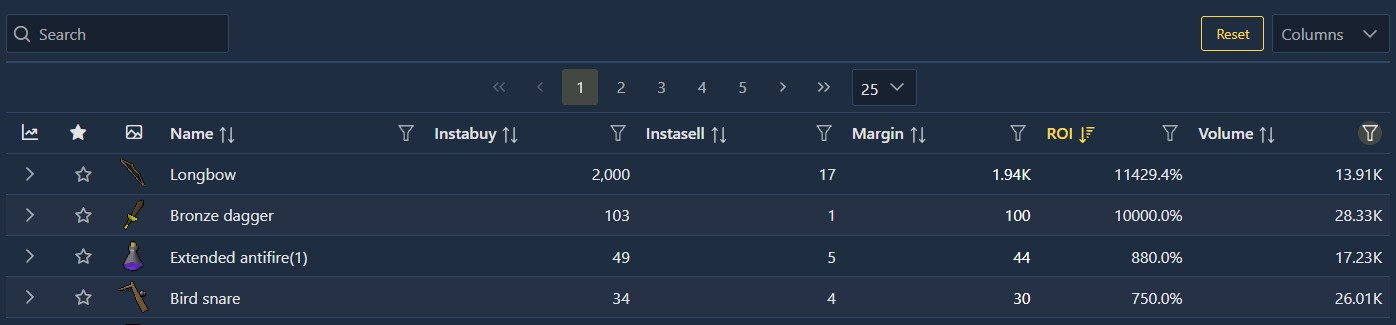
Open the share page#
Go to prices.osrs.cloud/share. There is no button for it in the menus: type the address.
Build the table#
Use Columns, the column filters and sorting exactly as on the items page.
Copy the address#
Copy the URL from your browser's address bar and send it.
What the link contains#
| Parameter | Content | Example |
|---|---|---|
columns | Column names separated by | (left out for the default columns) | Icon|Name|Instabuy|Instasell|Margin|Roi|Volume |
sort | field|order, order 1 (ascending) or -1 (descending) | computed.roi|-1 |
filters | The column filters, as JSON | {"item.dailyVolume":{"operator":"and","constraints":[{"value":10000,"matchMode":"gte"}]}} |
page | Page number, from 1 (left out on page 1) | 2 |
pageSize | Rows per page (left out at 25) | 50 |
The example above, before URL encoding:
/share?columns=Icon|Name|Instabuy|Instasell|Margin|Roi|Volume
  &sort=computed.roi|-1
  &filters={"item.dailyVolume":{"operator":"and","constraints":[{"value":10000,"matchMode":"gte"}]},
            "instabuyTime":{"operator":"and","constraints":[{"value":[1,"h"],"matchMode":"after_relative_date"}]}}
Good to know:
- The search box is not saved in the link.
- Premium and custom columns in a link only show for people who have premium (and, for custom columns, a custom column with the same name in their browser).
- A
/sharepage doesn't change your presets or your/itemstable. To keep a shared table for yourself, recreate it on the home page and save it as a preset. - Opening
/sharewithout parameters shows the default table: default columns, items traded in the last hour.
Item pages#
Every item page has a fixed, public address: https://prices.osrs.cloud/item/<id>
(the id is in the address when you open the item). Link previews, on Discord for example, show the item's name,
a short description and its icon.
Profit calculations#
The profit calculator has a Share calculation button that copies a link with your buy price, sell price, quantity and item. See its known issue with links that include an item.
Sharing your setup#
Favorites, presets, custom columns and the rest of your setup live in your browser, not in a link. To give them to someone (or another device), use Export (or Export everything) in Settings, send the file, and have them Import it.
Related#
- Share a list: step-by-step guide
- Items page
- Settings