Create a custom column
A custom column is a formula you write from the other columns, computed for every item with live prices: profit
for a full buy limit, margin as a percentage, anything you can write with + - * /. This guide writes one, tests
it, shows it in the table, then edits and deletes it. It ends with worked examples.
Open the column editor#
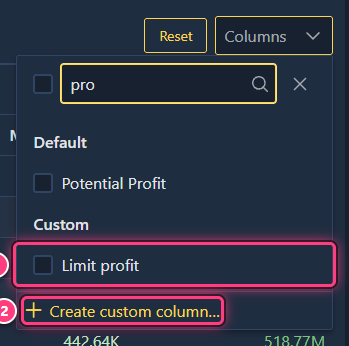
Go to Settings (the cog icon, top right) and open the Columns tab. Shortcut: in the prices table, open Columns and click Create custom column… at the bottom of the list.
The tab shows a Pick a column dropdown (your existing columns) and a Create column form.
Name the column#
Type a name in Column name, for example Limit profit. It can't reuse the name of a built-in column (such as
Margin) or of another custom column: a red message under the box tells you when it does.
Write the formula with $ and @#
Click the formula box and type $: a list of the columns you can use appears. Pick one with the mouse or the arrow
keys and Enter. Type @ instead to list the operators and functions. Numbers and the symbols + - * / ( ) , can be
typed directly.
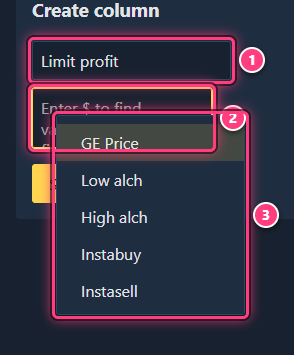
For Limit profit, build Margin * Limit: type $, pick Margin, type *, type $, pick Limit.
Test it in the simulation#
As soon as the formula isn't empty, a Simulation panel shows the formula computed for one item, with live prices. Type another item name in its search box to test with an item you know.
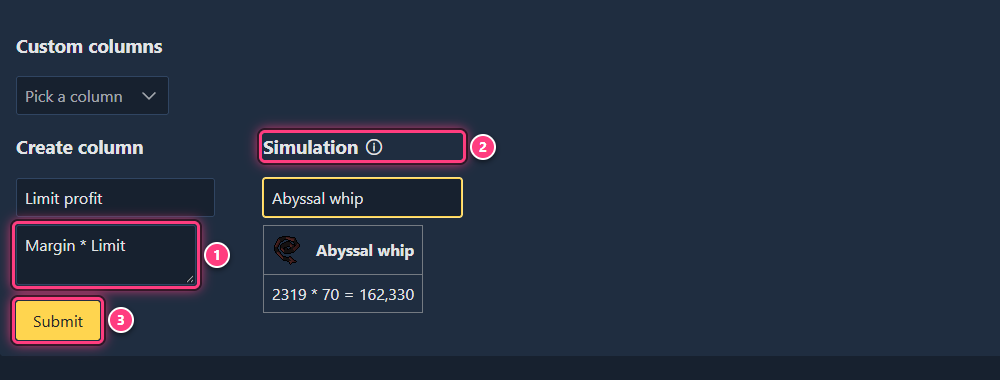
If no result shows after the formula, it can't be computed (often a missing parenthesis or a trailing operator).
Submit#
Click Submit. A "The column was successfully created!" message confirms it.
Show it in the prices table#
Back on the home page (or Favorites), open Columns: your column is listed under Custom. Tick it.
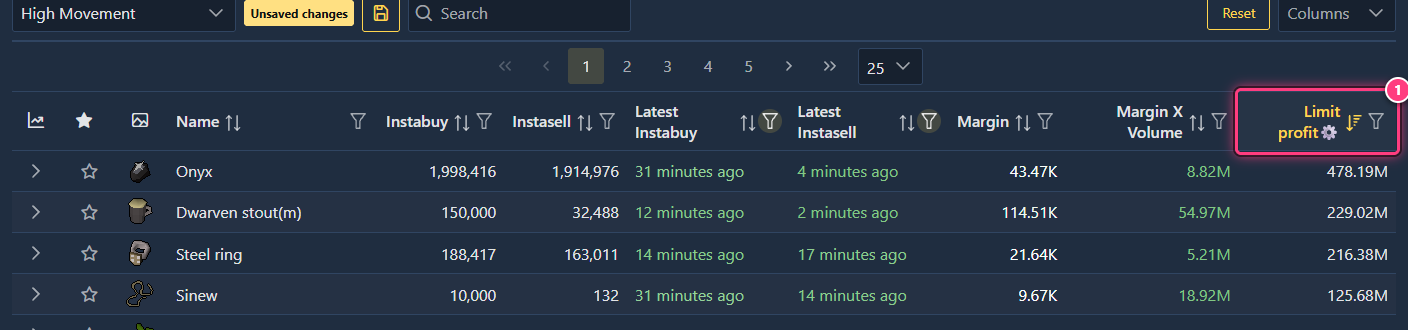
Its header ends with a cog (⚙) so you can tell it from built-in columns. Sort and filter it like any other column, and save a preset to keep it in your layout.
Edit it#
In Settings > Columns, pick the column in the Pick a column dropdown. The form becomes Update column with its name and formula filled in. Change them and click Submit ("successfully updated"). If you rename it, tick it again in the Columns list: tables that showed the old name drop it. Pick New Column in the dropdown to go back to an empty form.
Delete it#
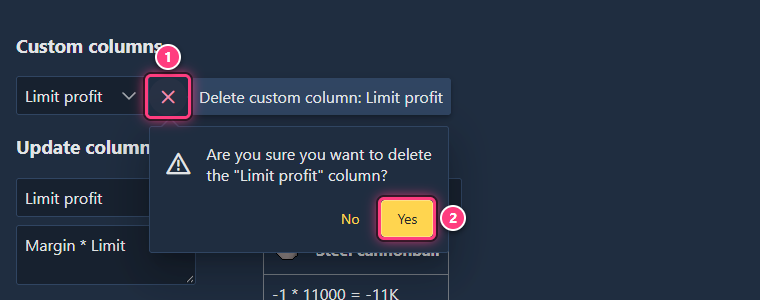
Pick the column in the dropdown, click the red x next to it (tooltip Delete custom column: ...) and confirm with Yes. It disappears from every table and preset that showed it.
Worked examples#
Each formula below is shown as you'd see it in the box; column names lose their spaces (Margin X Volume becomes
MarginXVolume).
Profit for a full buy limit#
Margin * Limit - what one full buy limit makes at the current margin. With a margin of 2,319 and a limit of 70, the
Abyssal whip gives 2319 * 70 = 162,330. Unlike Potential Profit, it ignores the daily volume.
Margin as a percentage#
ROI * 100 - the ROI column is a ratio (0.05 for 5%), so multiply it by 100 to read a percentage. The same thing
written out: ( Instabuy - Tax - Instasell ) / Instasell * 100. Values are rounded to 2 decimals.
Profit for a whole day of buy limits#
Margin * min( Limit * 6 , Volume ) - the buy limit resets every 4 hours, so up to 6 limits a day, but never more
than what actually trades in a day (Volume). min( a , b ) keeps the smaller value; max and avg work the same
way.
Formula reference#
| Kind | What you can use |
|---|---|
| Item and price columns | Instabuy, Instasell, Margin, Tax, ROI, Volume, Limit, MarginXVolume, PotentialProfit, GEPrice, Value, Highalch, Lowalch |
| Premium columns | Trends (Trend1d ... Trend1y, and their low / high), and the 5m / 1h / 6h / 24h instabuy and instasell prices and volumes (5mInstabuy, 1hInstasellvolume...) |
| Operators | + - * /, ^ (power), mod (remainder), parentheses |
| Functions | min( , ), max( , ), avg( , ), log (base 10), ln (natural log) |
A column with no value for an item (for example no limit known) counts as 0.
Troubleshooting#
My column isn't in the Columns list. You need to be logged in with premium. Custom columns are saved in this browser: another browser or device won't have them unless you back them up.
The column shows ? everywhere. The formula can't be computed: open it in Settings and check the simulation.
Submit says the name is invalid. The name is empty or already used by a built-in or custom column.
Next steps#
- Custom columns: the feature page.
- Build and save a preset with your column.
- Table columns: what each built-in column means.