Navigating the site
Every page shares the same top bar. Its icons have no text, so hover one to see its name. Here is what each of them does.
The top bar#

| # | Button | Goes to | Needs |
|---|---|---|---|
| 1 | Home | The item table with presets (items page) | - |
| 2 | Favorites | Your favorite lists (favorites) | - |
| 3 | Slots | Your live GE offers (slots) | Login + plugin |
| 4 | Track | Your price alerts (item tracking) | Login |
| 5 | Recipes | The recipe list (recipes) | Premium |
| 6 | Portfolio | Your investments (portfolio) | Premium |
| 7 | Games | A menu: Scaple and Loot Lense (games) | - |
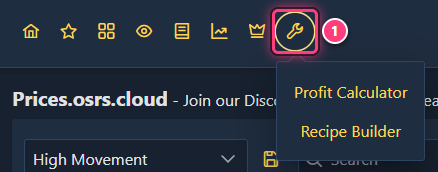
| 8 | Tools | A menu: Profit Calculator and Recipe Builder (tools) | - |
| 9 | Search for an item | Any item's page (and recipes, for premium members) | - |
| 10 | Documentation | These docs | - |
| 11 | Settings | Settings: account status, custom columns, backups (settings) | - |
| 12 | Discord | The Flipping Utilities Discord, in a new tab (Discord) | - |
| 13 | Notifications (bell) | Your latest price alerts (notifications) | Login |
| 14 | Account (person) | Log in with your token, or log out (accounts) | - |
Pages that need a login or premium are still reachable: they explain what you need instead of their content.
Games and Tools menus#
Games and Tools open a small menu instead of a page. Click an entry to go there, or click elsewhere to close it.
Searching for an item#
Click Search for an item (on a computer it already has the focus when a page opens, so you can type straight away). Suggestions appear as you type, matching partial and slightly misspelled names. Pick one with the mouse, or the arrow keys and Enter, to open its page. Ctrl-click a suggestion to open it in a new tab.
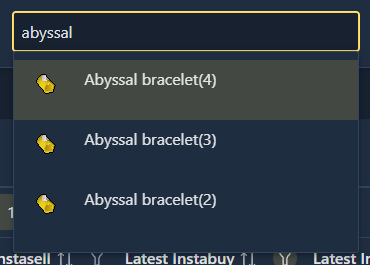
The top bar search finds a page to open. To narrow down the rows of a table, use the Search box above that table instead.
On a phone#
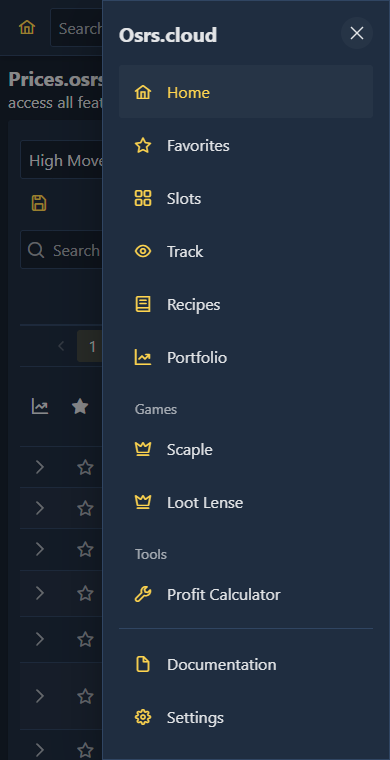
On small screens the top bar keeps only Home, the search, the bell, the account button and a Menu button (three lines). The menu opens a drawer with every other page, grouped like on desktop:
Pages you reach by URL#
A few pages have no top bar button:
- /items: every item in one table, without presets. Your column choice there is remembered separately from the home page.
/item/<id>and/recipe/<id>: an item or a recipe, linked from every table./share?...: a shared table view, see sharing.
Every page has its own address: bookmark it, or copy it from your browser to send it to someone.